
Product design · Flyway Desktop · 2025
Guiding people through the Schema Model
A flat setup screen was where most people gave up on Flyway Desktop. I turned it into a short guided sequence, and drop-off fell from 16.7% to 4.6%.
- drop-off before
- 16.7%
- drop-off after
- 4.6%
- improvement
- −12.1pp
- Company
- Redgate
- Product
- Flyway Desktop
- My role
- UX designInteraction designTelemetry analysis
- Methods
- Funnel telemetry · Progressive disclosure · Wizard design · Post-launch monitoring
OutcomeDrop-off at the Schema Model step fell from 16.7% to 4.6% for hybrid Enterprise projects, tracked since v8.4.5 shipped in August 2025.
Full story: showing every section.
Context
The step that unlocks everything
Saving objects to the Schema Model is the most important step in Flyway Desktop’s setup. Until it’s done, the tool can’t track database changes or generate migration scripts. It’s the difference between having the software installed and actually using it.
In early 2025, telemetry showed 16.7% of users exiting at exactly this point, right after connecting their development database. It was the second of two drop-off points in the funnel. The first, at the launch page, was a 20.7% drop we’d already addressed with a small navigation fix (that story is here). This one was bigger, more consequential and harder to diagnose. These people had already put effort into connecting a database. Losing them here meant losing people who were trying to succeed with the product.
Problem
Too much to figure out, too little guidance
After connecting, users landed on a flat list of database objects and a Save button, with nothing to say what to do first. You had to select which objects to track before saving, but nothing told you that. Static data tracking and filter options existed too, hidden behind a secondary button that most people never found or explored.
We had three guesses about what was going wrong: people were missing the Save button, not realising objects had to be selected first, or feeling lost in an unfamiliar workflow and giving up. All three had the same root cause: a consequential, first-time step with no scaffolding around it.
Evidence
What the numbers said, and what they didn’t
Telemetry told us where. 16.7% abandonment at the Schema Model step was the highest drop-off in the funnel, and it was the step that unlocked all of Flyway Desktop’s core value. That made it the highest-priority problem to solve.
It didn’t tell us why. For that I went back to the screen itself. The flat design asked people to make consequential, unfamiliar decisions without guidance. The root cause wasn’t a missing feature; it was the absence of scaffolding around an inherently complex first-time workflow.
The decision
Sequence, surface, simplify
The wizard had three jobs, and every option from the original screen had to survive.
Sequence the decisions
Break one overwhelming screen into discrete steps that can be understood one at a time.
Surface hidden value
Bring static data and filter configuration into the main flow, so people discover functionality that was always there but rarely found.
Simplify without removing
Every option from the original screen still exists. The wizard presents them in a better order, with clearer context at each decision point.
The design
A 2–4 step wizard with progressive disclosure
The number of steps varies by database type (two to four), but the structure is always the same: connect to the development database, choose which objects to track, configure static data, then set comparison options. A progress indicator is visible at every step, so you always know how much is left. Static data and filters, previously buried, are now named steps in the flow. You meet them even if you don’t configure them.
Step through the sequence as a user would see it.
Before
A list of database objects, a Save button, and a secondary button hiding static data and filter options. No indication of what to do first.
No screenshot of the old screen survives, so it’s described rather than shown. The numbered steps are the redesign.
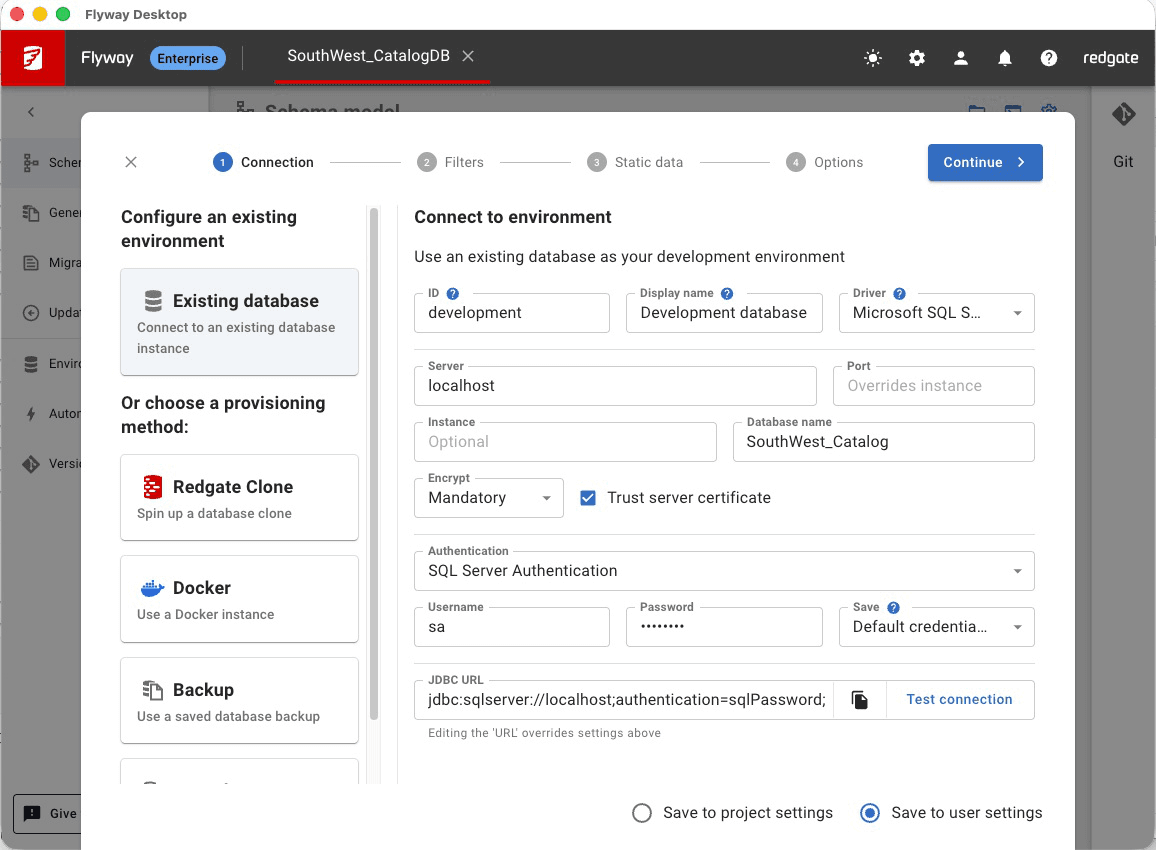
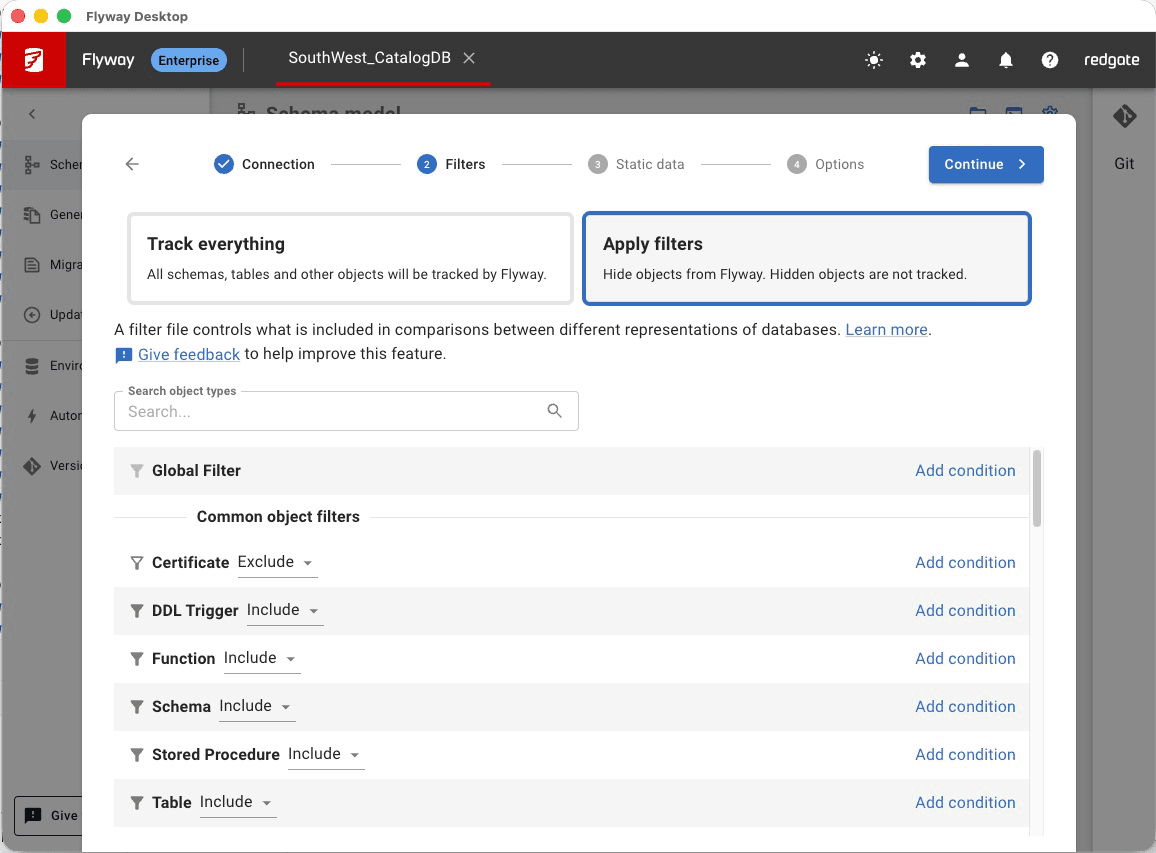
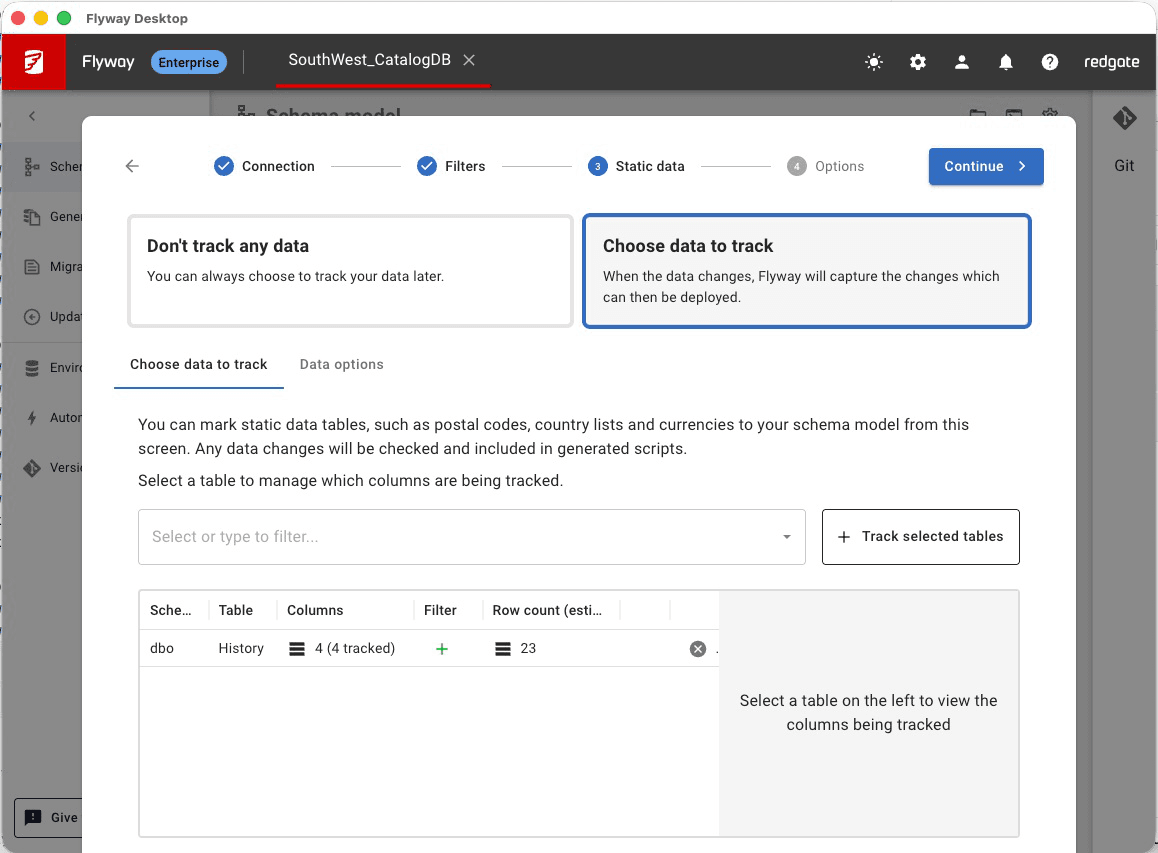
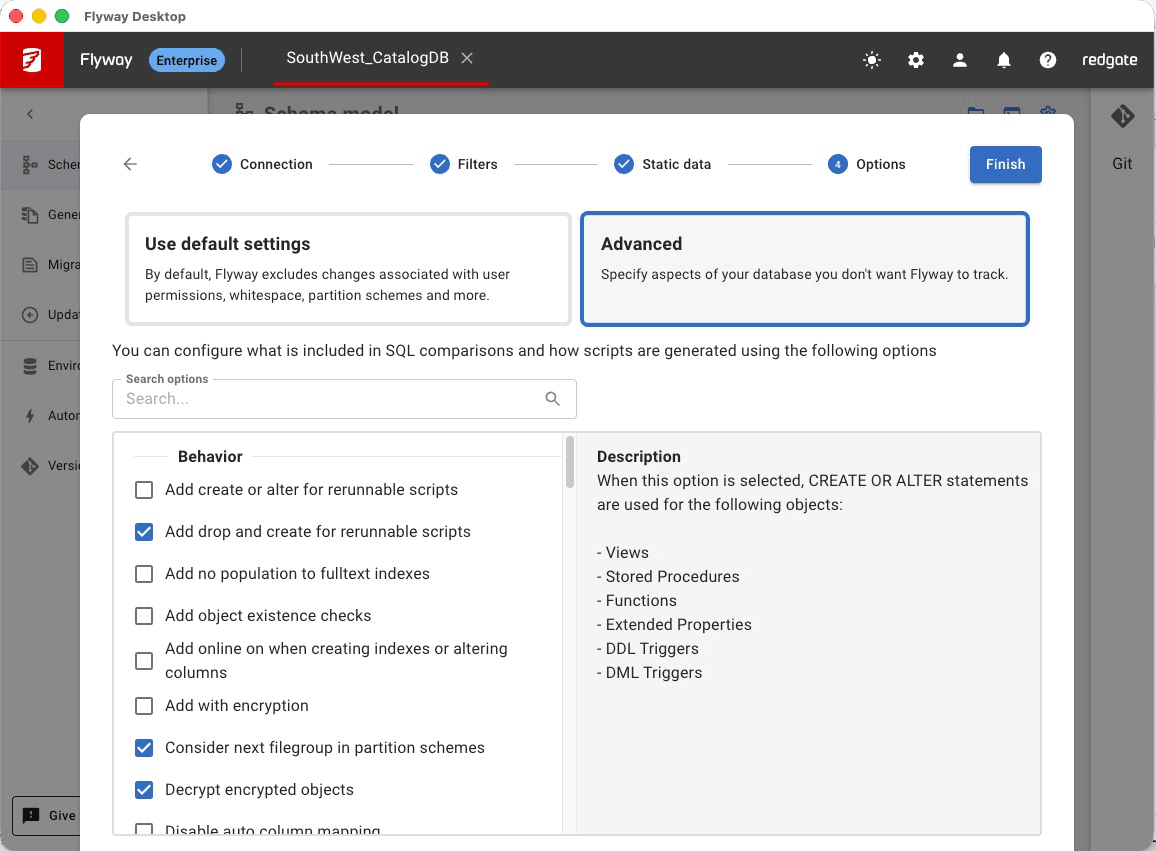
1 of 5
Approach
How it went
Identify from telemetry
16.7% abandonment at the Schema Model step was the highest drop-off in the funnel, and the step that unlocked Flyway Desktop’s core value.
Diagnose the failure mode
The flat screen asked users to make consequential, unfamiliar decisions without guidance. The root cause wasn’t a missing feature.
Design the wizard
A 2–4 step flow with visible progress. Each step presents one decision. Static data and options are included by default so people encounter them even when they don’t configure them.
Ship and monitor
Released in v8.4.5 on 29 August 2025. Funnel metrics tracked from release, alongside qualitative feedback from solution engineers working directly with customers.
Impact
From the biggest friction point to a step nearly everyone completes
−12.1pp
Schema Model drop-off fell from 16.7% to 4.6% for hybrid Enterprise projects — tracked consistently since v8.4.5 shipped in August 2025. Nearly all users now complete setup.
What the number means
A drop from 16.7% to 4.6% means 12 more people in every 100 now complete Schema Model setup. At scale, that’s the difference between a tool that frustrates early adopters and one that teams can confidently adopt and recommend to colleagues.
Surfacing hidden value
Static data tracking and filter configuration were already in the product; most people just never found them. The wizard didn’t add new features, it made existing ones discoverable. Solution engineer feedback confirmed users were actively engaging with them after launch.
Reflection
What this taught me
Guide people through unfamiliar territory
Users don’t need hand-holding everywhere. But at pivotal, once-in-a-setup steps, structured guidance makes a decisive difference. The problem was never the feature itself; it was the absence of scaffolding around it.
Surface hidden value before adding new features
The best improvement here wasn’t something new. It was a better way to reveal what already existed. Before reaching for new functionality, it’s worth asking whether the existing value is actually reachable in the current design.
Progressive disclosure reduces cognitive load
Breaking one complex screen into sequenced steps reduced the decision burden at each point. People who didn’t need static data or advanced options moved through quickly. Those who did could engage with each step in context, not all at once.